
UniFi 5G Backup: Great Hardware, Bad Plans
Ubiquiti's new 5G backup hardware is genuinely good. The bundled data plans are not. Here's what plans actually work, including an unlimited option for $14.95/month.
Internet is a critical utility in my household. I work from home, we have deep smart home integration, my kids need high school and college access, and every TV is streaming. When the cable goes out, nothing works.
My ISP doesn't go down constantly — maybe six or seven times a year, for anywhere from a few hours to two days at a stretch. That's frequent enough to cause real pain, but not frequent enough to justify paying for a full parallel ISP plan.
I need a Ubiquiti-native failover solution that's fast, effectively uncapped, and doesn't cost as much as a second full internet plan sitting idle until my ISP goes down.
What I want is a failover that actually works when I need it: no babysitting, no data cap I'd exhaust in an afternoon, and speeds that can sustain a household that normally burns through 160 GB per day.
For a long time, Ubiquiti's answer was the U-LTE-Backup-Pro — vendor-locked to AT&T on US models, slow, and expensive. That math recently changed with the addition of three new 5G devices to the UniFi lineup. The hardware is genuinely impressive. The bundled plans are not.
The Three Devices
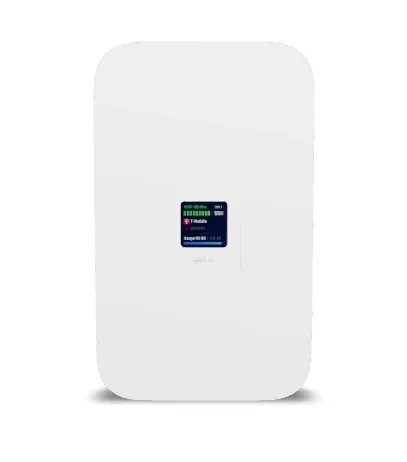
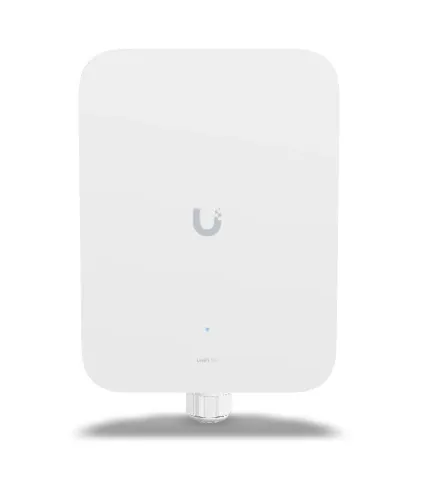
Ubiquiti launched three UniFi 5G backup options covering several use cases: affordability, max speed, and max speed with poor indoor reception.
| U5G Backup | U5G Max | U5G Max Outdoor | |
|---|---|---|---|
| Price (MSRP) | $99 | $399 | $399 |
| Peak down | 220 Mbps (RedCap 5G) | 3.4 Gbps | 3.4 Gbps |
| Antennas | 2 embedded | 4 embedded | 6 embedded (2 high-gain) |
| Antenna gain | — | — | 9 dBi |
| Ethernet | 1 GbE | 1 GbE | 2.5 GbE |
| SIM slots | 1 | 1 | 2 (dual SIM) |
| Weatherproofing | Indoor | Indoor | IPX6 / IP67 |
| Mounting | Desktop / wall / window | Desktop / wall / window | Wall + pole mount |
The entry-level U5G Backup uses 5G RedCap (Reduced Capability) — a 5G standard designed for IoT and light backup use cases with a practical ceiling around 220 Mbps down. For low-demand households or pure IoT failover, that may be enough. For a multi-person household that needs to keep working, streaming, and staying on video calls through an outage, 220 Mbps is tighter than what I'd want ideally, but would still be viable.
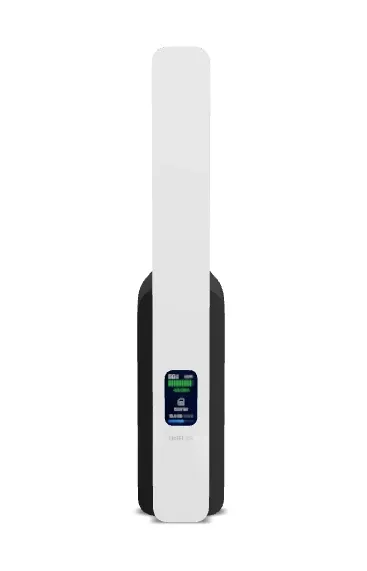
The U5G Max and U5G Max Outdoor both deliver full 5G speeds — theoretical 3.4 Gbps down. In the real world, forum posts are reporting 580-720 Mbps on the Max with the right plan and reasonable signal. These are also paper specs. I have to deal with the reality of where 5G antennas are in my neighborhood and how well they penetrate Florida concrete block house construction.
The pricing detail worth noticing: the Max and Max Outdoor are the same price. You're not paying a premium to get the outdoor model. The only reason to choose the indoor Max over the Outdoor is aesthetics and not wanting to drill holes in your exterior walls or having more exposure to rain ingress or lightning.
The Bundled Plan Problem
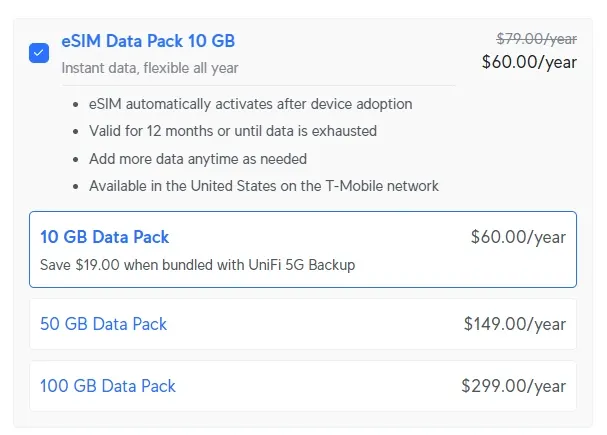
Ubiquiti offers optional eSIM data packs you can add at purchase or buy separately, running on the T-Mobile network:
- 10 GB for the year — $60
- 50 GB for the year — $149
- 100 GB for the year — $299
My house on a typical day can use 160 GB. That would mean the 10 GB annual plan disappears in minutes. The 100 GB annual plan gets consumed in less than a day. Both are completely unusable for anything beyond the lightest backup scenario. This is where Ubiquiti prices itself out of viability. I don't know if this is meant more for businesses keeping lower bandwidth critical systems like terminals or PoS systems online maybe, but these plans don't work for prosumer households. I can't understand the decision.
This isn't new behavior from Ubiquiti — the old U-LTE-Backup-Pro had the same problem. The hardware improved dramatically, but it's ruined by the plan limitations. They could have had a bundled seamless checkout experience even at a slight premium for the convenience, but instead it's a fragmented mess.
At least this time around the devices are fully unlocked. Any compatible carrier SIM or eSIM works. Compatible is doing heavy lifting in that sentence and it's honestly kind of confusing what sort of plans are supported. Fortunately, the Ubiquiti community has done the hard part of figuring out what actually does work.
Plans That Actually Work
| Plan | Network | Cost | Data | Eligibility |
|---|---|---|---|---|
| Computers4People Shield | T-Mobile | ~$15/mo | Unlimited (soft deprioritization after 100GB) | Income / benefits required |
| Tello Unlimited | T-Mobile | ~$25/mo | 50GB high-speed, throttled after | None |
| Google Fi | T-Mobile | Add-on to existing plan | Shared with plan | None |
| AT&T Prepaid | AT&T | ~$25/mo (annual) | 20GB/mo hard cap | None |
| Verizon | Verizon | TBD | TBD | None — not officially supported yet |
Computers4People Shield (~$14.95/month) — if you qualify
The most frequently recommended option in the UniFi community, and worth knowing about — but it comes with an important caveat most forum threads skip over.
Computers4People is a legitimate 501(c)(3) nonprofit that refurbishes and donates computers to underserved communities in New Jersey, New York, and Massachusetts. Their Shield Internet plan is an extension of that mission: affordable unlimited 5G internet, backed by T-Mobile's network via Mission Telecom, intended for households that earn under 200% of the Federal Poverty Level or receive qualifying government benefits (SNAP, Medicaid, SSI, free school lunch). You check a box affirming eligibility when you sign up.
If you qualify, it's a strong plan. Unlimited T-Mobile 5G, T-Mobile-branded SIM, confirmed working on both the U5G Backup and the Max in forum posts. Community-reported speeds on the U5G Max: 580-720 Mbps down, ~40 Mbps up. After 100 GB per month the plan is eligible for deprioritization during congestion — no hard cap. For a backup line that only activates during ISP outages, hitting deprioritization thresholds is unlikely.
One thing to know: T-Mobile's "Binge On" video throttling is enabled on this plan and can't be disabled. Streaming video is capped at 480p on affected services. On a failover line that's probably tolerable — but worth knowing if you have family expecting Netflix at full quality during an outage.
If your household doesn't meet the income or benefits eligibility, this may not be a valid plan for you and I wonder if the eligibility is a weird gray area. The alternatives below cover the same use case without eligibility requirements.
Tello (~$25/month)
Tello is a T-Mobile MVNO (Mobile Virtual Network Operator, a reseller) that multiple users confirm works in these devices. The unlimited plan runs $25/month with no contract — but note that high-speed data is capped at 50 GB per month, after which speeds are throttled for the rest of the billing cycle.
For a backup line that's only active during occasional outages, 50 GB is unlikely to be a problem most months. A sustained multi-day outage at heavy household usage could push through it, but that's an edge case. If you already have a Tello unlimited line, you can add a data-only device to it rather than starting a new plan.
Google Fi (Unlimited Premium or Flexible)
Google Fi's unlimited plans include the ability to add a data-only device without requiring an extra phone line — it runs against the family plan's shared data.
eSIM activation confirmed working, with one important gotcha: activate via eSIM using the "Activate your tablet" QR code in the Fi portal, not a physical SIM. Physical SIM activation has been unreliable for several people based on forum threads I've sifted through.
Second gotcha: eSIM activation must happen while the device is on a LAN port, not the WAN port. Move it temporarily to a switch port for activation, let it reboot, complete activation, then move it back to WAN. This tripped up multiple people before the workaround surfaced.
Speeds with Fi are carrier-dependent and tend to lag behind Computers4People at equivalent signal — one user reported 64 Mbps down / 41 Mbps up from an office with moderate signal, and 35/29 from a poor-reception area. That's actually the same speed as my cable upload, but really slow on the download side. That wouldn't work to keep the entire family online at once in my case, but for light backup use I can see that as being viable for Google Fi users.
AT&T Prepaid
For households where T-Mobile coverage is weak or nonexistent, AT&T prepaid is the proven alternative. In one forum post, a user migrating from the old U-LTE-Backup-Pro confirmed it transfers over without issues.
Pricing: approximately $25/month paid annually for 20 GB/month, but again, that's a terrible plan. I'd sneeze and use that 20 GB limit. This feels like when we paid per text message in the 1990's.
Verizon
Verizon appears as "coming soon" in the UniFi app as of mid-2026, and community experience is inconsistent — some users with existing Verizon SIMs from other devices have gotten it to work; others cannot get the device to detect the SIM at all. Verizon is historically restrictive about which third-party devices it allows on its network. Not recommended until officially supported.
What Doesn't Work
- T-Mobile Home Internet plans — explicitly blocked; data-only plans required
- T-Mobile Backup Internet ($20/month) — sounds promising, but it's locked to T-Mobile's own gateway hardware and isn't compatible with U5G devices
- Ubiquiti bundled eSIM packs — unusable for heavy data users
- BNESIM — random mention from one forum thread I came across. It connects, but runs on China Mobile infrastructure in the US with poor performance. I hadn't even heard of this before.
What About Starlink?
The speeds are real — Starlink is a legitimate internet connection, not a trickle of backup bandwidth. And unlike cellular, it works in areas with poor T-Mobile or AT&T coverage. If your location simply doesn't have viable 5G, Starlink is probably the right answer.
The problem for my use case is cost. Starlink residential runs between $55-$120/month. For a household that loses internet six or seven times a year — for a few hours to a couple of days — that's effectively paying for a full parallel ISP at full price to sit idle 99% of the time. The math doesn't work.
There's also the ecosystem angle. The UniFi 5G devices integrate natively as a managed WAN failover — the gateway handles the failover automatically and the whole thing is visible in the UniFi console. Starlink can be plugged into a WAN2 port and used for failover, but you're managing two separate systems rather than one unified setup.
For someone with poor cellular coverage, or who runs a home business and genuinely can't tolerate any downtime, Starlink starts making sense. For my situation — occasional outages, solid outdoor 5G signal, already in the UniFi ecosystem, it's more hassle than I ideally want to get into.
The Indoor Reception Problem
Neither the U5G Backup nor the U5G Max has external antenna connectors — all antennas are embedded. If your cellular signal is solid indoors, this doesn't matter. If 5G signal degrades significantly once you're inside — which is common with mmWave and even mid-band 5G through exterior walls — it matters a lot.
The U5G Max ships with a window mount, which helps. Placing it flush against a window facing the tower can recover meaningful signal that a phone-in-hand test from outside your wall might otherwise suggest is available.
For situations where the window mount isn't enough: the U5G Max Outdoor exists for exactly this reason. Mount it on the exterior wall where signal is strong, run a single PoE cable inside to your UniFi switch, and the indoor reception problem goes away entirely. At the same $399 price as the indoor Max, this is often the better call for anyone in a building with signal penetration issues.
A Note on CGNAT
All cellular carriers use CGNAT (Carrier-Grade NAT), which means no public IP address and no inbound port forwarding on cellular connections. You can see this in the screenshots people share — the WAN IP shows as a 192. address.
For most home failover scenarios, CGNAT doesn't matter: streaming, browsing, video calls, Unifi Protect (cloud relay), Ecobee and other cloud-connected smart home devices all work fine on CGNAT. Tailscale and VPN clients that initiate outbound connections are also unaffected.
If you self-host anything that requires inbound connections — a reverse proxy, publicly accessible home lab services, direct port forwarding for gaming — CGNAT is a real limitation on cellular backup. That's worth knowing before purchasing.
What I'm Planning to Buy
I haven't pulled the trigger yet because two open questions will determine both which hardware and which plan actually make sense for my situation.
Question 1: What are my real outdoor speeds?
Before assuming the U5G Max is worth the premium over the U5G Backup, I need to know what my local T-Mobile tower is actually delivering. I ran a speed test today from outside the house on my phone and maxed out around 65 Mbps down. If that's the ceiling — not a congested-time fluke — the hardware tier decision changes considerably. The U5G Backup's 220 Mbps RedCap limit would never be the bottleneck if the tower itself tops out at 65 Mbps. I'd be spending $300 more for headroom I can't use. I've seen higher speeds from that tower before, so I want to test at different times of day before concluding anything.
- If speeds regularly clear 220 Mbps: U5G Max Outdoor, mounted on the exterior wall, run PoE inside. The Max actually earns the premium.
- If speeds stay around 65 Mbps: the U5G Backup at $99 does the same job. No need to pay 4x more for a faster device the tower can't feed.
Question 2: Do I qualify for Computers4People Shield?
As covered above, Shield is designed for low-income households and carries an income/benefits eligibility requirement. If I qualify, it's the cleanest plan — $14.95/month, unlimited T-Mobile 5G, no data cap to blow through during a multi-day outage.
- If I qualify: Shield is the plan regardless of which hardware I end up with.
- If I don't: the options get murkier. Tello at $25/month is the next best fit, but the 50 GB monthly high-speed cap is a real concern if an outage stretches across multiple days at full household usage. There isn't currently a clean unlimited option without eligibility requirements at this price point.
I'll update this once I have both answers, but it still seems like only the hardware part of the equation is solved and cellular coverage and plans are still not ideal where it's a "shut up and take my money" kind of purchase.
This article is based on pre-purchase research and community findings. I'll update it with real-world speeds and setup notes once the hardware arrives.