
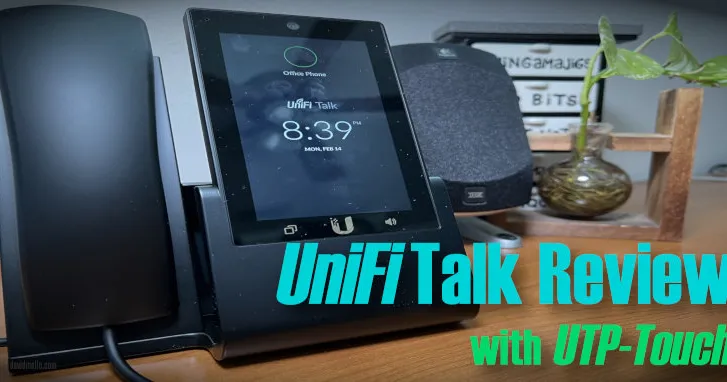
UniFi Talk Review: Plans, Pricing & Phones After 4 Years
UniFi Talk after 4 years: Plus ($9.99/mo) vs Pro ($24.99/mo) plans, how it compares to Ooma, Vonage, and magicJack, the UTP-Touch phone, and robocall blocking.
My rating: 5 out of 5 for the UniFi Talk
UniFi Talk Pros and Cons
Pros
- About a third of what I paid my ISP for VoIP service
- Smart Assistant has blocked every robocall since I set it up
- Voicemail transcription delivered to email
- View UniFi Protect cameras right on the UTP-Touch screen
- Call quality has held up after four years
Cons
- No mobile calling on the $9.99 Plus plan; the softphone requires Pro
- Doesn't qualify for alarm panels that dial out over a landline
- Early versions occasionally crashed silently until rebooted (since resolved)
- Number porting is a manual process that took 14 days
UniFi Talk is Ubiquiti's VoIP phone service: a monthly subscription that runs on a UniFi console like the Dream Machine and works with Ubiquiti's touchscreen desk phones or, through an adapter, the analog and cordless phones you already own. After four years, it's still my home phone service, and I'd switch again. At $9.99/mo it costs about a third of what my ISP charged for VoIP, the Smart Assistant has blocked every robocall since I set it up, and call quality on the UTP-Touch desk phone has held up the whole time. This review covers both UniFi Talk plans, how the price compares to Ooma, Vonage, and magicJack, the current UniFi phone lineup, setup and number porting, and what four years of daily use taught me.
Why I Chose UniFi Talk
$20 less for more features than I had before
The release of the UDM-Pro SE (UniFi Dream Machine Pro, special edition) gave me my excuse to upgrade my USG + CloudKey combination to newer Ubiquiti networking gear, and with it came access to UniFi Talk.
My ISP-provided VoIP service was reliable, but provided just basic phone service and was over $30/mo with taxes. UniFi Talk provides additional office-level phone features for $9.99/mo per line. I felt if Ubiquiti's VoIP service could be as seamless with even more features it would make sense to port my phone service to UniFi Talk.
What was holding me back?
The advantage my ISP had was the VoIP modem they provided backfed my home phone wiring to allow all my normal, non-VoIP, phones, including my DECT cordless phones, to work over VoIP using the normal phone line in my house. I didn't have to upgrade my phone wiring to CAT6 or use special VoIP phones.
At the time, Ubiquiti only supported their corded VoIP touch screen phones, which use PoE over CAT6, which would have been inconvenient since I still wanted to use my DECT cordless phones. That changed when they offered (in early access) an ATA device that backfeeds normal house wiring the same way. The UniFi ATA is now generally available, linked at the bottom of the article.
So I got the ATA (analog telephone adapter) to use UniFi Talk with my older analog and DECT phones, and also purchased the Ubiquiti UTP-Touch phone for my home office to use the extra UniFi Talk features.
UniFi Talk Plans and Pricing (2026)
UniFi Talk now has two plans in the US. Prices and allowances below are from Ubiquiti's UniFi Talk page as of October 2026:
| Feature | Plus | Pro |
|---|---|---|
| Price | $9.99/mo per number | $24.99/mo per number |
| Calling | 3,000 minutes/mo (worldwide inbound, outbound to US, Canada, and Mexico) | Unlimited (same coverage) |
| SMS | 50 messages/mo | Unlimited |
| Call transcription | 60 minutes/mo | 600 minutes/mo |
| Caller ID name lookups | — | 3,000/mo |
| Mobile softphone | — | UniFi Identity app (iOS and Android) |
| Number porting | Free | Free |
I'm on the Plus plan. For a household phone line, 3,000 minutes a month has been plenty, and I haven't needed mobile calling since calls can be redirected to my cell phone (see call forwarding below). Pro makes more sense if you want to place and receive calls from your phone through the UniFi Identity app, or if you run a business line with heavy call and text volume.
In Canada, Plus is C$12.99/mo and Pro is C$24.99/mo. In the UK there is a single Standard plan at £7.99/mo.
UniFi Talk vs Ooma, Vonage, and magicJack
The three home VoIP services that come up most as alternatives are Ooma, Vonage for Home, and magicJack. Prices are as listed by each provider in October 2026 and exclude taxes and regulatory fees:
| Service | Monthly cost | What you get | Hardware |
|---|---|---|---|
| UniFi Talk Plus | $9.99/mo per number | 3,000 minutes, Smart Assistant, call recording, voicemail transcription | UniFi console (e.g. Dream Machine) plus a UniFi phone or ATA |
| Ooma Basic | $0/mo + taxes and fees | Basic calling | Ooma Telo ($99.99 list) |
| Ooma Premier | $9.99/mo + taxes and fees | Adds blacklists, multi-ring, voicemail forwarding | Ooma Telo |
| Vonage North America | $9.99/mo (new-customer pricing) | Unlimited calls to US, Canada, Puerto Rico, and Mexico | Vonage Box included |
| magicJack | $119 for 3 years (about $3.31/mo) | Calling through the magicJack device | magicJack device (includes first year of service) |
On monthly cost alone, Ooma Basic and magicJack are cheaper. Where UniFi Talk wins for me is what the $9.99 buys: the Smart Assistant call screening, call recording, and voicemail transcription are office-phone features, and everything is managed in the same UniFi console as my network and cameras. The tradeoff is the hardware requirement. UniFi Talk makes the most sense if you already run a UniFi gateway; if you don't, the console and phone costs outweigh the monthly savings. For business-focused alternatives, RingCentral's RingEX Core plan runs $20–30 per user per month depending on billing term.
UniFi Talk Features
These are the features I use most.
Smart Assistant: Blocking Robocalls
Smart Assistant lets you set up a voice prompt/greeting tree that you can use to direct calls to numbers and extensions. The hidden feature I use it for is that this effectively blocks most robocall spam calls. Most of the spamming robot autodialers trying to reach you for your car's extended warranty or duct cleaning don't have logic to press a number to continue so these calls do not ring through.
I've been able to block all robocalls since setting up UniFi Smart Assistant.
Call Recording
Where legal to do so you can automatically record all your calls which is great to protect yourself or serve as something you can refer back to if you don't want to take notes.
Voicemail Transcription
UniFi Talk voicemail can send you email notifications and even transcribe your voicemails allowing you to quickly read the contents instead of listening or having to rewind for something like a phone number spoken too quickly on the recording.
UniFi Talk Cons
- Alarm panels: Older alarm panels that use a landline to dial out to a central monitoring station, like ADT, often require a Qualified Managed Facility Voice Network which UniFi Talk does not qualify as. You'd need a dual path system that uses internet and cellular instead. If you're in this situation, Abode is worth looking at — their systems use cellular and broadband for monitoring without depending on a traditional phone line.
- Mobile calling requires Pro: There's no mobile calling on the $9.99 Plus plan. Ubiquiti now offers a softphone through the UniFi Identity app, but only on the $24.99/mo Pro plan.
UniFi Talk Phones and Hardware
UniFi Talk works with Ubiquiti's own phones or, through the ATA, with the analog and cordless phones you already own. The current lineup:
| Device | Display | Notes |
|---|---|---|
| UTP-Touch (the one I use) | 5", 720x1080 | Touchscreen desk phone, PoE |
| Touch Max | 7", 1280x800 | Larger horizontal touchscreen, 5MP camera, PoE+ |
| G3 Touch Pro | 5" | Current-generation desk phone |
| G3 Touch Enterprise | 7" | Current-generation desk phone |
| G3 Touch Wall | 7" | Wall-mounted touchscreen |
| Phone Flex | 2.57" | Compact desk or wall phone, PoE |
| UniFi ATA | — | Connects up to two analog phones or fax machines |
The ATA is the piece that made UniFi Talk work for my house: it backfeeds the existing phone wiring so my DECT cordless phones work the same way they did on my ISP's VoIP modem.
UTP-Touch Review
The UTP-Touch has a familiar iPhone-like virtual touch pad for dialing.
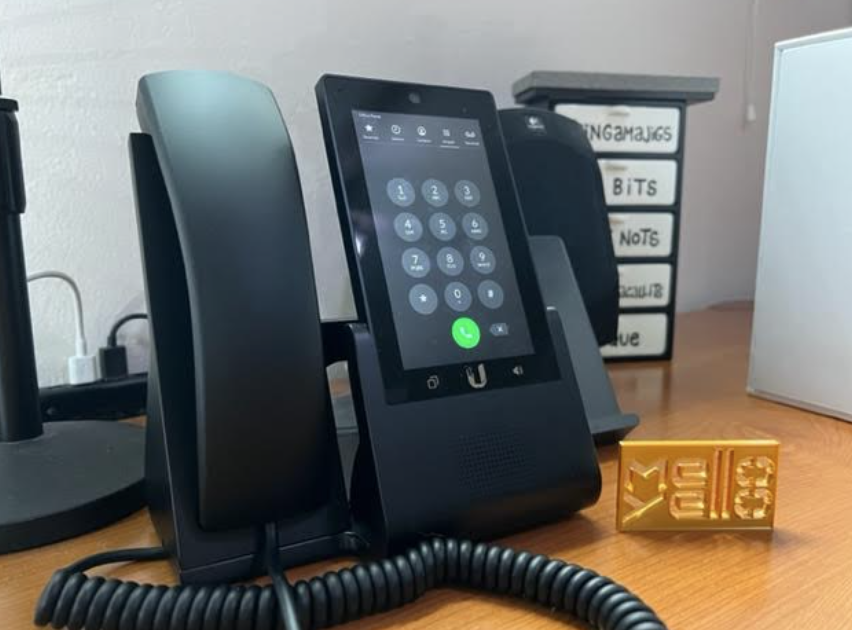
The sound from the handset is good and it includes a speakerphone which also has nice sound quality. Nobody has complained on the other side about the sound clarity from the microphone even when on speaker. On the right side you have a USB-C port and place to plug in a headset for hands-free calling without using the speakerphone.
The touch screen is responsive and the 5" model I have is 720x1080 HD, while the Touch Max has a 7" screen in a horizontal 1280x800 HD resolution. Having these nice screens is important because
You can view UniFi Protect cameras on the phone screen
I can easily monitor my security cameras like the UniFi G4 Doorbell from the phone screen on my desk.
The phone draws around 3.02 watts of PoE power according to the switch's port status power monitoring.
Call Forwarding
In the UTP-Touch you can set your status to Available, Do Not Disturb, or Redirect. When using Redirect you can choose to forward calls to another number like your cell phone.
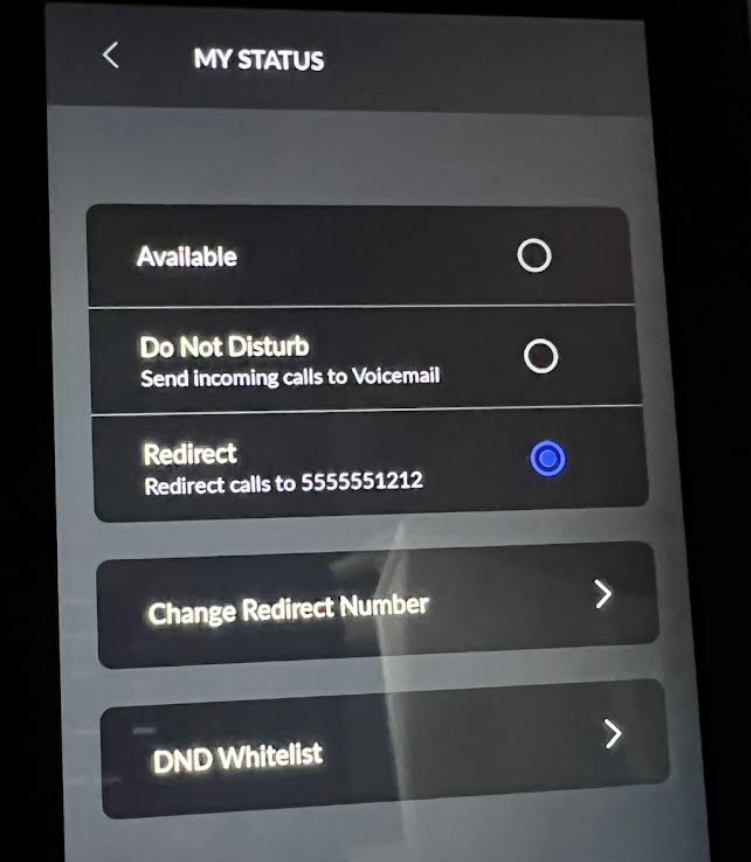
To get there, swipe down, press My Status, and select Redirect.
UTP-Touch Camera and Customization
You can customize from a long set of choices your ring and hold music. There is a 5MP camera at the top of the phone. It wasn't enabled at the time I purchased it so I wasn't sure if it would be used for video calls or UniFi Protect down the road. As of 2026 it's used for video calling between UniFi Talk phones and can't be used in UniFi Protect.
UniFi Talk Setup with UTP-Touch
Setup is pretty simple with a UDM-Pro or UDM-Pro SE. These are Ubiquiti's Dream Machine gateways that allow you to run UniFi Network, Talk, and Protect on a central box along with an integrated 8 port switch. The SE version's switched ports are all PoE so I was able to use those to directly power the UTP-Touch.
The steps consist of
- Plugging in a UniFi Talk device to a PoE port on the dream machine (or PoE switch).
- Enabling the UniFi Talk app in the UniFi Management Portal and beginning the guided setup wizard.
This starts a 15 day free trial that comes with 2 temporary phone numbers that you associate with your UTP-Touch phone or ATA device.
After, if you want to port your number, you can start that process in the UniFi Talk UI.
Porting your phone number to UniFi Talk
Ubiquiti makes it pretty easy to initiate number porting, but it is a surprisingly manual process.
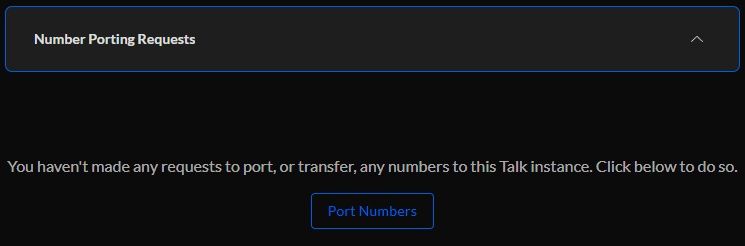
In UniFi Talk select Settings, Numbers & Subscriptions, and expand Number Porting Requests. Inside there is a button you click called Port Numbers and it walks you through the initial process. You need to provide proof of ownership of the current number. A bill with your phone number is usually recommended.
The bill is uploaded during the guided setup during the porting request so have that handy. After, a letter of intent needs to be electronically signed.
Ubiquiti support handles the processing with the outgoing provider. They informed me via email that they received the initial request and later when they had arranged the scheduled porting date. It took 14 days in my case to complete.
The support rep from the porting team did a good job keeping me informed of the process.
UniFi Talk, Impressions 4 Years Later
Four years in, UniFi Talk is still working well. Below are some experiential impressions and takeaways since the original review.
The audio quality on calls has been consistently impressive, the handset clarity and speakerphone quality have held up, and nobody on the other end has ever complained about the microphone. The UTP-Touch display is still sharp and responsive, and being able to pull up UniFi Protect cameras on the phone screen has become genuinely useful day-to-day. Glancing at the doorbell camera to see who's at the door or checking for a package delivery without leaving my desk is one of those small conveniences that adds up.
There were some reliability hiccups in the first couple years though infrequent. UniFi Talk would silently crash resulting in no incoming calls, no outbound dialing, until I rebooted the app. That was frustrating because unless I realized I hadn't had a call in a bit or tried to dial out I wouldn't know there was an issue. That issue appears to have been resolved in subsequent updates and I haven't run into it in the years since.
The Smart Assistant has continued to do its job. Robocall spam autodialers still can't navigate the voice prompt, so they still don't ring through. This is still my favorite feature.
Pricing for the Plus plan has held at $9.99/mo and Ubiquiti has continued incrementally improving the platform — including the ability to customize the phone screen display.
The wall-mount version of the phone, the UTP-G3-Touch-Wall was released. I've been waiting for it to replace one of my old analog wall mount phones in another room though the pricing seems kind of high at present. I also would need to figure out how to fish CAT-6 to the location.
Final Thoughts
UniFi Talk has been a genuinely good decision for my home setup. The robocall blocking alone made it worth switching (it was becoming maddening before), and the call quality, features, and price have held up well over four years. If you're a Ubiquiti household looking to cut your phone bill without sacrificing features, it's an easy recommendation.
The Analog Telephone Adapter (ATA) that lets you use your existing traditional non-VoIP phones with UniFi Talk is now in general availability for purchase.