
Getting Dirty with AI Testing: A StarEast 2026 Trip Report on Evals, Vibe Coding, and Prompt Engineering
StarEast 2026 trip report: what a hands-on AI testing tutorial taught me about prompt engineering, evals, and building an AI chatbot as Count Dracula.
My morning tutorial at StarEast 2026, Getting Started with AI-Driven Automation, led with DORA metrics and progressed into using AI vision to see the software under test the way a human tester would. Kevin Pyles's afternoon session was something different. Within the first ten minutes, Pyles had already demonstrated an app he built with AI that morning to randomly draw playing cards for calling on attendees during the icebreaker. Before the formal content started, the point was already made.
"There is no way I would have taken the time to do this," he said. "I literally would have gotten out a piece of paper, wrote down Ace through King, and checked them off. But instead, boom, I can do this."
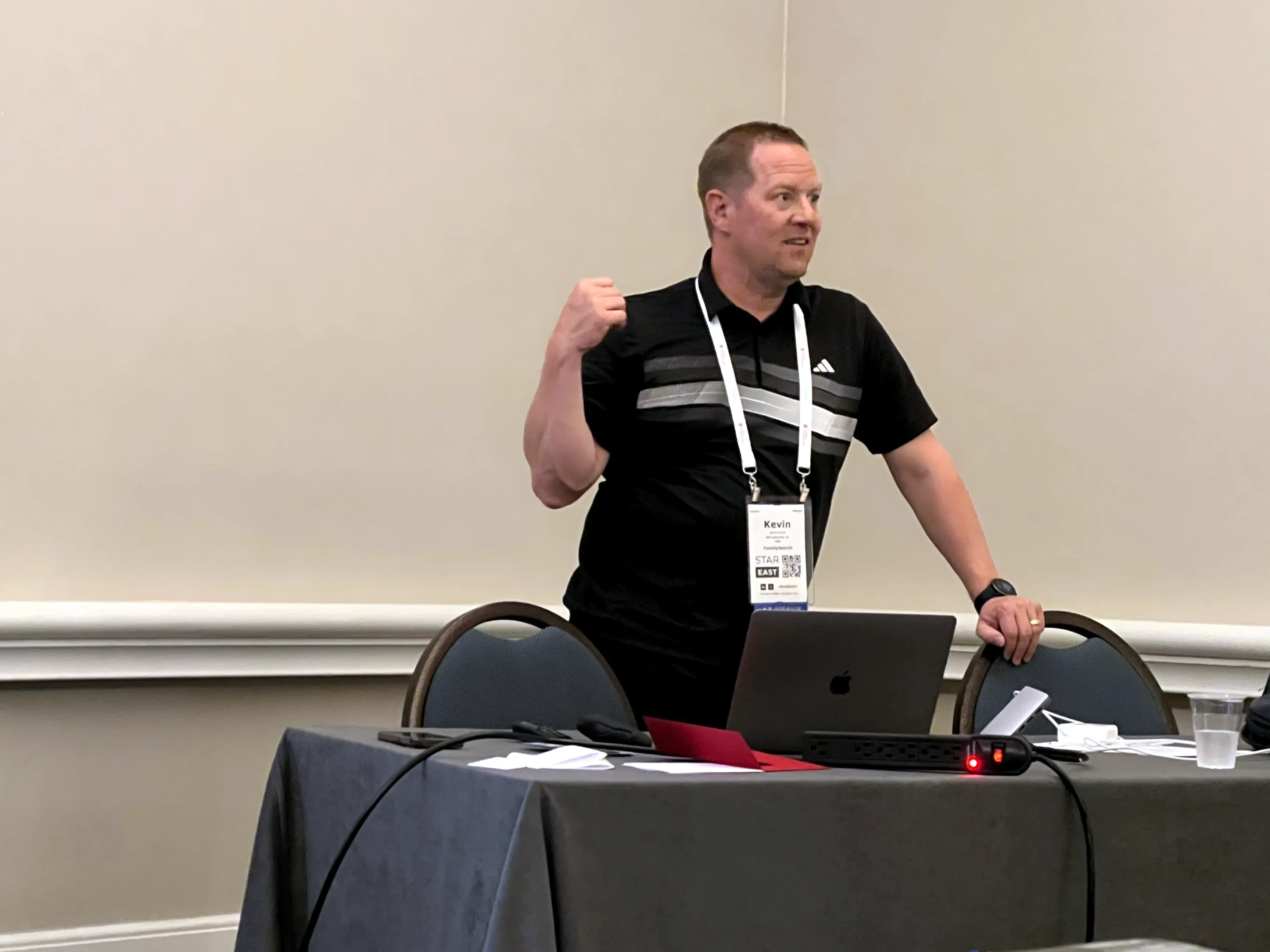
The session was titled "Getting Dirty with Data, Bots, Agents and Code: A Hands-On Approach to AI Testing." Pyles was on the ACE team at FamilySearch, though I've read he's left the organization shortly after the conference (I had followed him on LinkedIn after attending his tutorial). By the end of the day I had built four working tools, including a vibe-coded text comparison app in full gothic style and a contact form chatbot that spoke entirely as Count Dracula.
Most of what I learned I expected to file away as useful-when-relevant. This is my trip report from that afternoon. Two weeks later, it became immediately relevant when I was asked to assist testing an agentic insurance chatbot.
LLMs Are Like Garbage
Pyles opened with a simple, or perhaps not so simple, request.
"Will you please take out the garbage?"
Simple enough. But what garbage? Which can? Does it need to be bear-safe? Is it safe to take out at this hour?
His point: what you get back from an LLM depends entirely on the context you provide. A request that feels complete to the person making it can be profoundly ambiguous to the system receiving it, because the system has no access to the unstated assumptions you carry about your environment, your goals, or your definitions.
To illustrate this point, he ran a duck-drawing exercise with the room. Small groups received different written instructions, kept secret from other groups, and directed a teammate to draw from them. Instructions ranged from "draw a duck with a bow tie" to a highly specific set of constraints: oval body, 50% page height, triangular legs, no feet. I observed rather than participated in this one. Pyles then showed what Gemini produced for those same prompts. One prompt instructed a duck on "a blank page." Gemini put it inside a Microsoft Word document. Another specified "50% height." Gemini's duck took up closer to three-quarters. "Is it height from the feet? Is it height from the body?" Pyles asked. "I don't know, but Gemini likes to hallucinate about ducks."
What trips the human artist trips the LLM: the gap between what an instruction says and what the person giving it assumed. The fix in both cases is making those assumptions explicit.
"These are the things that you have to provide to the LLM or you end up with a grumpy teenager. And grumpy teenagers hallucinate really well."
Five context categories, he said, shape every prompt: history, location, ability, quantity, and changes. Applied to "take out the garbage": which can, which floor, whether you can carry it, how many bags, and whether it's recycling day. Leave any of them implicit and the LLM fills them in without you.
Vague Prompts, Vague Results: Why Prompt Specificity Matters
Pyles opened the data module with a story pre-dating ubiquitous AI tools.
He had been on a team tasked with proving whether a company's website was getting better. Both Pyles and the CEO felt the current site was in bad shape, but Pyles was tasked with collecting real user feedback to prove it either way beyond just their opinion. Pyles collected customer feedback and ran sentiment analysis, tracking the positive-to-negative ratio over time. Pre-ChatGPT, doing this was specialized technical work. The story was context, not an AI success case, but he used this as a lead-in to our tutorial exercise.
The exercise: use generative AI to create fictitious customer feedback data for a cellular phone company. The starting prompt was intentionally bare:
Hey ChatGPT, could you generate some feedback data, just make it up, for a website for a cellphone company?
Pyles asked us: What do you notice reviewing that output? Is it useful? What's broken? What would you change?
It was interesting for me because the first pass actually looked pretty good: well-structured JSON with varied data. Others in the class got results that varied widely in format, fields, and content.
Before refining the prompt, he offered four questions to answer first:
- Why are you building this solution?
- What problem are you trying to solve and why?
- What do you want the LLM or AI to do and why?
- What do you want the output to look like and why?
Answering these is prompt engineering in practice. The more explicit and correct a prompt is from the outset, the fewer hallucinations and rework later. They also force you to think through the problem before handing it off.
The refined prompt that followed answered all four questions:
Hey ChatGPT, I am working on a project to analyze feedback data. You are an expert in data creation and analytics. Could you create feedback data that would be given on a cellphone company's website and include the following fields for each feedback item: ID (start at 1000 and increment), Person Name (generate random realistic first names only), Location (go with random states and real cities in the United States), Comments (include comments ranging anywhere from 5 to 100 word comments which should range anywhere from complimentary to very negative), Ratings (between 1 and 5 stars), Date (randomize the dates between April 5, 2025 and September 30, 2025), Device (Smartphone models)
Coincidentally, on my machine, the vague prompt happened to already produce data that matched several of the fields the refined prompt would go on to specify.
The verbose prompt produced structured, usable data, more consistently across the class. The next step was analysis:
Hey ChatGPT, could you analyze this feedback data and provide some insights for me?
The lead-in story gave the exercise its weight. What had once been specialized technical work was reduced to a one-sentence prompt.
After, we used a prompt to build a shareable dashboard:
Hey ChatGPT, I would like to know how much of the feedback is positive, how much is negative and how much is neutral. I would also like to provide a graph of the sentiment of feedback over time. And I would like to put all of this into an interactive web page that I could easily share with my team, so I need it to be a standalone html page with whatever additional CSS or JS files are necessary. Can you create that for me?
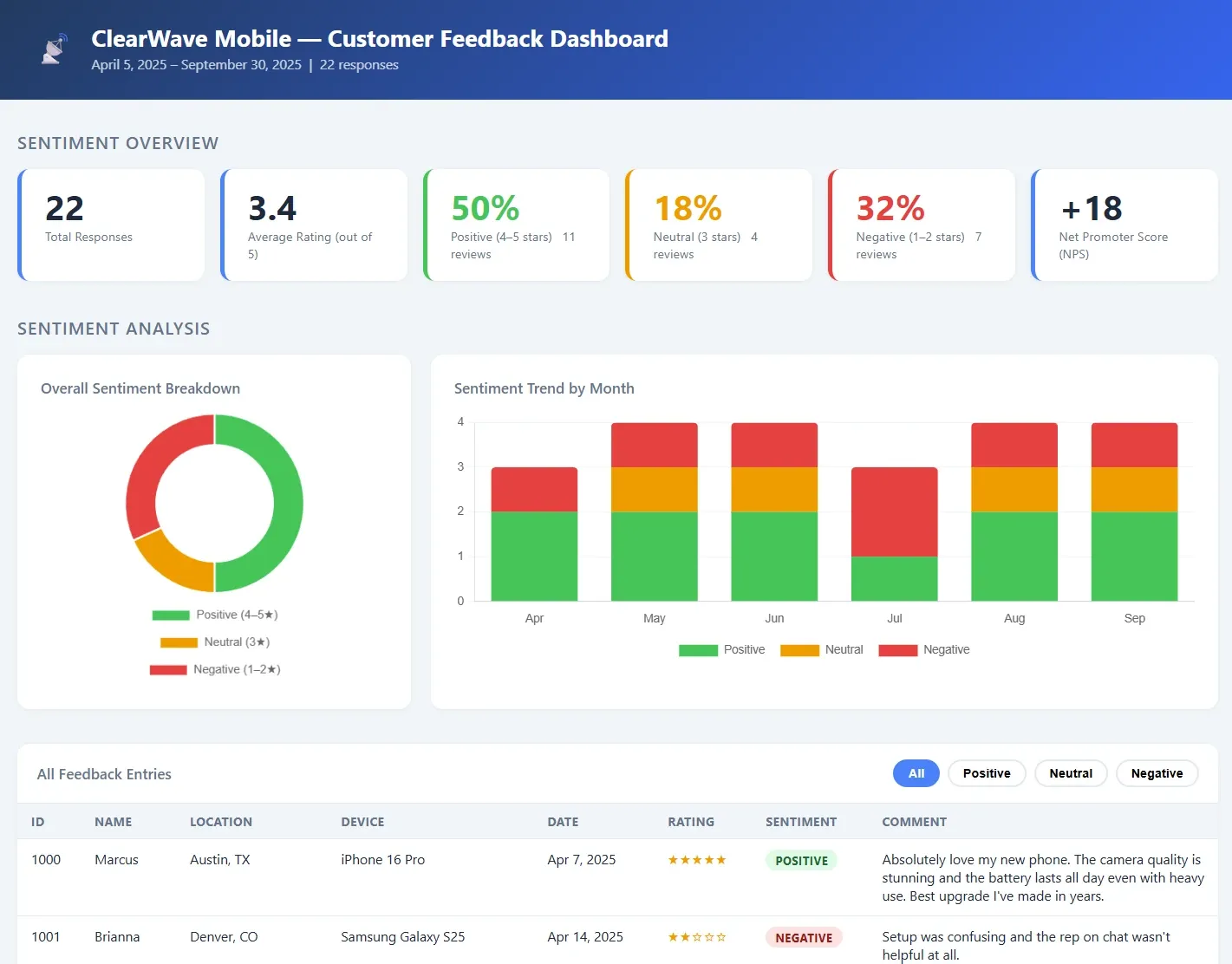
The work Pyles described doing manually took real technical skill. The exercise produced the same output in about fifteen minutes. What the four questions changed was not the underlying work. It was the precision of what got handed to the AI.
Vibe Coding a Goth-themed Text Compare Utility
Pyles introduced the Comparinator with a question he kept asking himself: "Wouldn't it be cool if?"
He kept needing to compare two pieces of text. Free tools existed but none had the right combination of features. Using ChatGPT directly meant rewriting the prompt each time and dealing with hallucinations. Sending text to an online tool meant sharing potentially sensitive customer data with a third party. So he built his own, and walked the class through using vibe coding to create our own.
The workflow ran in four stages. First, conversation in plan mode rather than agent mode. In agent mode, Pyles explained, every question triggers the LLM to start building. "If you are in agent mode, every time you ask it a question, it goes, 'Can I build it?'" Plan mode tells the LLM to think, ask questions, and clarify requirements without touching code. In Claude Code, Shift+Tab twice toggles between them.
The starting prompt Pyles provided was long and specific:
Hey ChatGPT, I am working on a project where I will need to compare two pieces
of text from various scenarios. I would like to build an app that will help me
with this. I would like to call it Comparinator. I will need two input boxes that
allow up to 10,000 characters. Please add a tracker so the user can see how many
characters out of 10,000 have been added to each box. I would like a Compare button
that will then calculate the differences between the two pieces of text. I would
like options to ignore case and ignore punctuation on demand. I also would like a
reset button that will clear out the input boxes and all additional fields. I would
like to see stats from the comparison of the texts that will show % similarity,
word count A, word count B. Also track the accuracy % between the two input boxes.
Also, I would like a field that shows highlighted in red and green the words that
are the same (green) and different (red). And for good measure, I would like a
toggle that will allow us to switch the theme to dark mode, while maintaining the
glassmorphism look that we desire. Before you get started could you summarize what
I have said, and ask any clarifying questions?
That last sentence is the point. Establish intent before execution.
After the clarifying conversation, the next prompt asks the LLM to write a spec document in markdown capturing everything discussed. This becomes the grounding artifact: take it to Claude Code, Copilot, Cursor, or Gemini and run the same build. The LLM output will differ between tools, but the requirements stay stable.
# Comparinator – Specification Document

## 1. Overview

Comparinator is a web-based application designed to compare two pieces of text
(up to 10,000 characters each) and provide a clear, visual, and statistical
breakdown of their similarities and differences.

## 2. Core Features

### 2.1 Text Input

- Two input fields (Text A and Text B)
- Maximum of 10,000 characters per input
- Live character counter for each input (e.g., 0 / 10,000)
- Visual warning when nearing character limit (turns red at 9,000+)
The default design target was glassmorphism. The redesign exercise asked attendees to reskin the app in a completely different visual style. I went goth: deep purple palette, Cinzel and Crimson Text fonts, blood-red accents.
When the redesigns were in, Pyles made it official: "You are all now vibe coders, thank you for ruining the world."
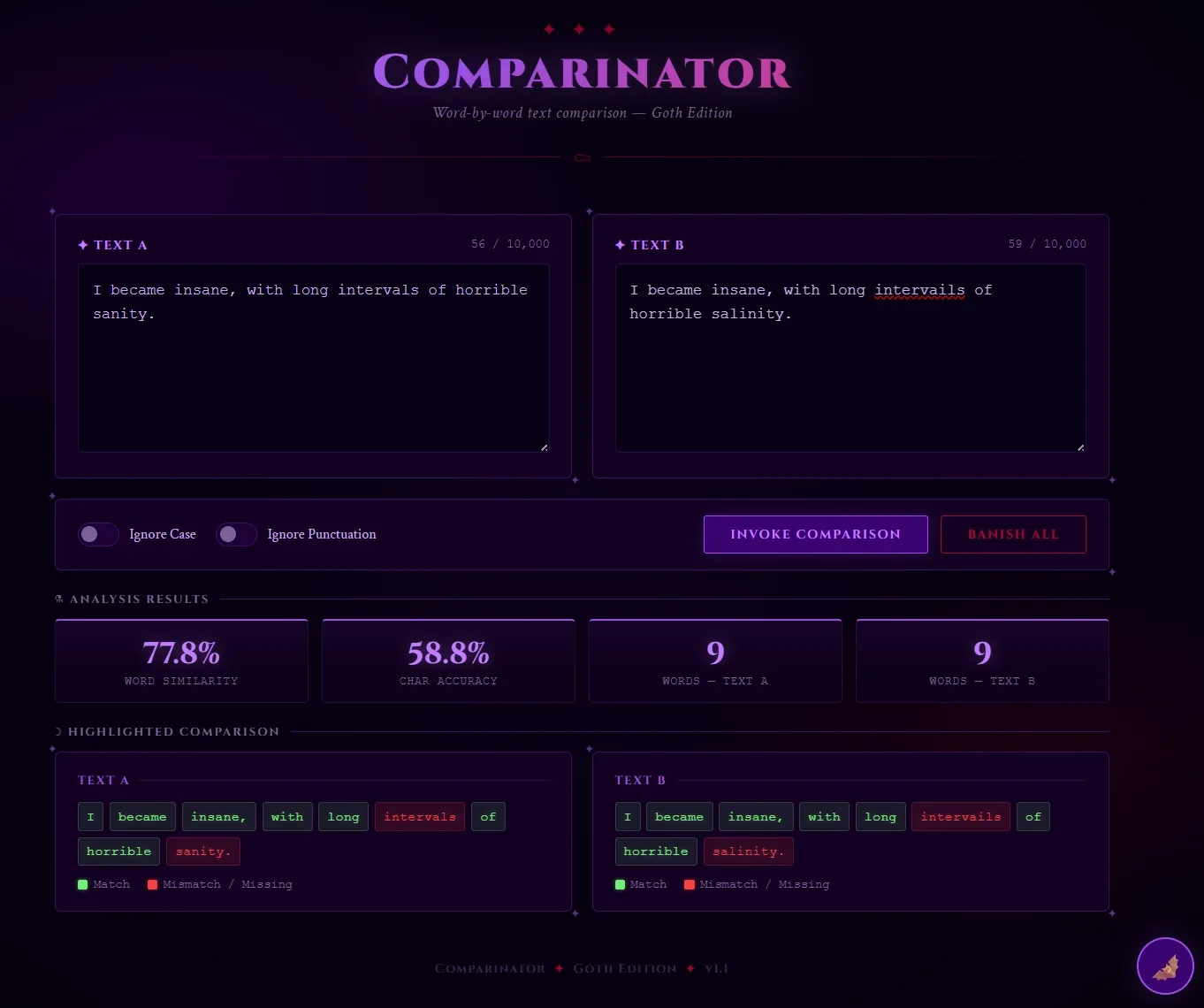
What the redesign revealed was something more than visual non-determinism. Comparing what different attendees produced from the same base prompt, the UI variation was substantial. Pyles attributed this to context contamination: prior conversations, local configuration, and whatever the LLM infers about you from your session history all shape the output. "Can you tell what I've been talking to my LLM about?" he said after running his own version. "It snags some context from somewhere else."
*This probably explains why the first pass of the customer sentiment data, even with the vague prompt, produced familiar JSON output for me since a lot of my day-to-day usage uses similarly structured data.
For anyone trying to share prompts as repeatable artifacts across a team, that is a real problem. He proved this using the class. Everyone worked off the same prompt and got slightly different results. He emphasized you cannot think that you can use the same prompt to generate the same result deterministically even on your own computer later. Using a spec doc to build from requirements is a safer approach versus a saved prompt string because the same prompt run in a different context will not reliably produce the same result.
At work we are starting to use OpenSpec partly to address this among other reasons.
He also mentioned a good practice, something I already use but was glad to have validated: "Ask the LLM for what is missing or [for] additional ideas." When writing a large spec doc or prompt I will tend to end with something like, "Let me know if anything was unclear or if you have any suggestions before proceeding."
The AI 80/20 Rule Is a Feature, Not a Bug
Pyles also touched on what he called the 80/20 rule: even as AI improves, the work still tends to split roughly 80% AI and 20% human.
"If you think that the AI is going to do 100% and it only does 80%, you're really disappointed. It might do 100% of the typing. And then you have to do 20% of the thinking. It will do 100% of the code, but then you have to do 100% of the testing. And somehow that works out to 80-20. It's a magical bug [how the proportion tends to land there]."
The point was about expectations going in. If you know the 20% is always there, you will not be disappointed when it shows up. What changes as models improve is the form it takes: answering the questions the LLM asks, testing what it produces, refining a prompt that got close but not right. The proportion stays consistent even when the shape does not.
Chatbots Stop, AI Agents Find a Way
Pyles opened the agents section with a quote he said he had posted on LinkedIn, paraphrased from someone at Anthropic — he couldn't recall exactly who: "Chatbots stop. AI agents find a way."
The distinction he drew was behavioral. A chatbot hits a dead end when no response pattern matches. An agent finds another path. "It doesn't just respond with whatever it was told to respond to. It can actually go out and do something because of what's been requested or triggered."
He showed a seven-level spectrum of chatbot autonomy, from a deterministic contact-us form on one end to a fully autonomous agent with no human required on the other. The testing implication scales with the level. A contact form is 100% deterministic and fully automatable. A fully autonomous agent can take real-world actions that a fixed response set cannot anticipate or constrain.
"I don't know what level is my chatbot or my agent. And that will determine how much effort I really need to put into it."
To make this concrete, Pyles first demonstrated Parrot Pete, a pirate-speaking chatbot from his own GitHub repository, showing what an on-page embedded chatbot looks and feels like before attendees built their own. The exercise: build a contact-info-gathering chatbot, embed it in the Comparinator site, and prepare it for AI chatbot testing in the following module.
I was already building in goth. My prompt to the LLM was roughly: build a contact form chatbot as Count Dracula, collecting visitor details so he can come find them.
One sentence of premise. The LLM extrapolated the rest: Shakespearean register, a "Book of Souls," escalating Gothic menace at every step of the form. The greeting:
Ahhh… a visitor crosses my threshold. How delightfully bold. I am Count Dracula,
lord of these ancient halls. And you, dear mortal… what name shall I inscribe
in my Book of Souls?
The confirmation on submit:
Mwahahaha… it is done. Your details are mine. Sleep well tonight, dear mortal
— though perhaps not too well. I shall be calling upon you… very soon. 🦇
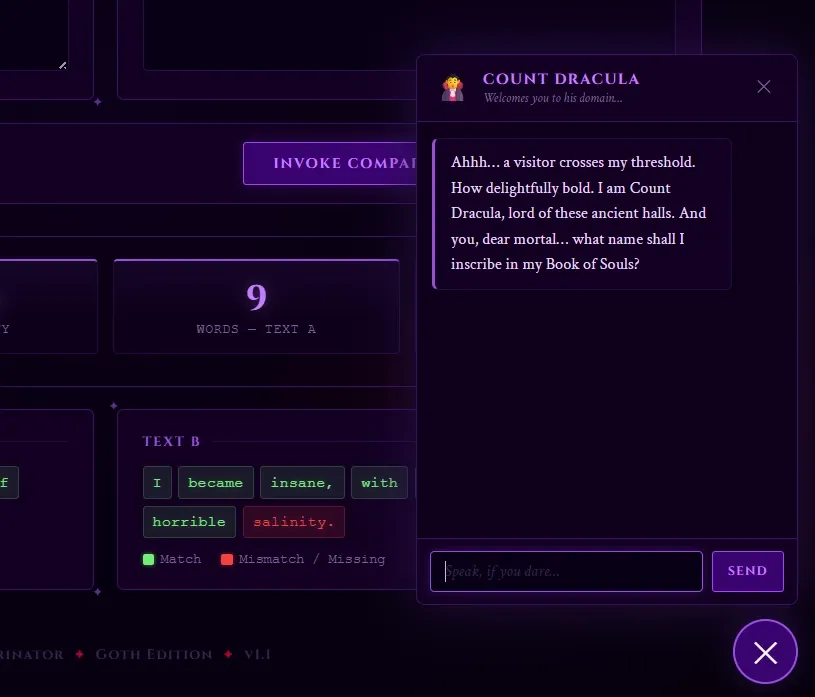
The persona prompt is a simple tool with a larger lesson inside it: giving the LLM a clear character with a clear motivation produces coherent, consistent output across the entire interaction. The character did not need to be specified line by line. The premise was enough.
Evals Are Just Regression Suites
The testing section of the session produced the sharpest reframe of the day.
"What is an eval? It is a regression suite, codename, because developers didn't like testers so they came up with a different name."
When you hear that a model "scored X on this eval," Pyles explained, it means a standardized regression suite focused on a particular domain: medical knowledge, code generation, safety. Each test case is a prompt plus an expected result, the same structure testers have used for decades.
For reference on format, he pointed to DeepEval, a publicly available eval framework on GitHub. His recommended approach for generating an eval: share your spec document with the LLM, apply a testing persona ("you are an expert in testing chatbots and LLMs"), and ask it to build the eval suite.
The eval generated for the Dracula chatbot during the exercise covered more ground than I would have mapped out in the same time. State machine transitions across all seven conversation states, validation edge cases for email and phone formats, session isolation confirming separate users did not share state. The test data used Jonathan Harker at 1 Transylvania Lane. The theme held all the way to the assertions.
describe('processMessage — full happy path', () => {
  test('walks all states in order and contactSaved only on final confirm', () => {
    const session = newSession();

    let result = processMessage(session, 'Jonathan Harker');
    expect(session.state).toBe(STATES.GET_EMAIL);
    expect(result.contactSaved).toBe(false);

    result = processMessage(session, 'jonathan@castle.com');
    expect(session.state).toBe(STATES.GET_PHONE);

    result = processMessage(session, '555-867-5309');
    expect(session.state).toBe(STATES.GET_ADDRESS);

    result = processMessage(session, '1 Transylvania Lane, Bistritz');
    expect(session.state).toBe(STATES.CONFIRM);

    result = processMessage(session, 'yes');
    expect(session.state).toBe(STATES.DONE);
    expect(result.contactSaved).toBe(true);
  });
});
One boundary Pyles was explicit about: "It's not testing security, internationalization, localization, probably not even usability. All it's testing is inputs and outputs, which is good for inputs and outputs. It's awful if you wanted to run on a mobile device."
That matters. Evals handle response correctness at scale. The broader test strategy still requires a tester to think about what evals do not reach.
His closing instruction for this section: "Show your work through your dashboards and evals and results. Don't let it disappear into spent tokens."
Two weeks after the conference, a team came in with a request to build a test suite for an AI chatbot they had built internally. The eval framing from this session transferred directly. Understanding what an eval is structurally meant not starting from scratch. The tooling was different and the assertion layer required an LLM judge rather than an exact-match comparator, but the test design thinking was the same. The full story of that engagement is in How to Test AI Chatbots and Agents: A Real-World QA Engagement.
AI Document Transcription
The final module used Pyles's real work at FamilySearch as its foundation. His team's job was converting historical genealogy documents to structured, searchable data, around 1.7 billion of them across multiple languages, handwriting styles, and centuries. The testing challenge at that scale: when no human can read the original document, how do you verify the AI transcribed it correctly?
The hands-on exercise gave attendees a series of progressively harder document images to transcribe, starting with a fictional driver's license and moving through gravestones, 17th-century Dutch records, and 18th-century Brazilian marriage records.
The base prompt was intentionally underspecified: "Hey ChatGPT, could you transcribe all the text in this image for me?"
For most documents, it held up. The Brazilian marriage record was where it broke. The LLM returned Dutch or German text and offered to normalize the spelling into modern Dutch. The document was written in Portuguese.
The revised prompt:
"Hey ChatGPT, you are an expert in transcription of old Brazilian marriage documents. I have a document that is handwritten in Portuguese, and I need help transcribing it. It is a marriage record. I believe it is from the 1740s. Please take your time in understanding the content of the record and verifying the letters and words. There are some signatures in the document as well, and we would like to get as much of that as possible."
The output improved dramatically: correct language, correct characters, signatures identified with Portuguese names. The foreign language documents were the hardest in the exercise, and that before/after showed more clearly than anything else in the session what the difference between an underspecified and a well-contextualized prompt actually produces.
The garbage metaphor from the morning came full circle. The LLM has access only to what you provide. A transcription request without language, document type, era, and handling instructions is as ambiguous as "take out the garbage" without knowing where the cans are.
Pyles's summary: "You are just like the LLM." When you are tired from going down a hallucination rabbit hole, your prompts degrade in quality the same way LLM outputs do. The fix for both is to clear context, take a break, and restart with a complete setup rather than trying to correct from inside a broken session.
What I Took From It
Going in, I expected to file most of this away for later. The team I work with was using AI to co-author code and tests, but testing an AI system directly was not on the near-term roadmap. Two weeks later, that changed without warning.
The concept that transferred most directly was evals as regression suites. The framing cut through the jargon immediately. Knowing what an eval is structurally meant the new ask had a recognizable shape even though the tooling was unfamiliar.
The other thing that stayed with me came from the Comparinator redesign: the same prompt produced notably different UIs on different attendees' machines. Pyles framed it as context contamination from prior LLM sessions. For anyone building shared prompt libraries or trying to replicate AI-generated outputs across a team, that is not a minor nuance. The spec document is the more portable artifact, and the more durable one.
The third thing came from the opening. Pyles built that card-draw app the morning before the session because "wouldn't it be cool if" now has a cheap enough answer to be worth asking. Before AI, the thought would have stayed a thought.
That pattern shows up in my own work daily. Ideas that previously had no realistic path from concept to working prototype — small tools, automations, experiments worth trying but not worth a full development sprint — now have one. The 20% is still real: the directing, the refining, deciding what's actually worth building. But the gap between "wouldn't it be cool if" and a working version has closed enough that asking the question has become a habit worth keeping.
The session was four hours and four working tools. All of them ran. Most of what it covered showed up in practical use faster than I expected.